
Java, Spring, AI, News & Certifications

Resolve UiPath Assistant's Orchestrator URL Error

Learn how to find the correct UiPath Orchestrator base URL, update the Assistant settings, and reconnect your machine.

In order for a robot managed through the cloud-based UiPath Orchestrator to run on a client machine, a connection between the two systems must be established through the UiPath Assistant tool. But if there’s a misconfiguration of the UiPath Orchestrator URL, the dreaded ‘Orchestrator isn’t present at the indicated URL’ error will occur, and the connection will fail to be established. Here’s how to fix that UiPath URL problem.

Learn UiPath RPA Quickly

Here’s how to learn UiPath and RPA:

  • Create a basic UiPath Hello World app
  • Create a UiPath robot in Orchestrator
  • Configure the UiPath Assistant to connect to Orchestrator
  • Build a UiPath orchestator process
  • Set UiPath triggers to run your unattended robots

You’ll be UiPath expert in no time!

UiPath’s URL

Two pieces of information are required to make this connection happen:

  • The hexadecimal machine code provided by Orchestrator
  • The correct URL to identify Orchestrator on the network
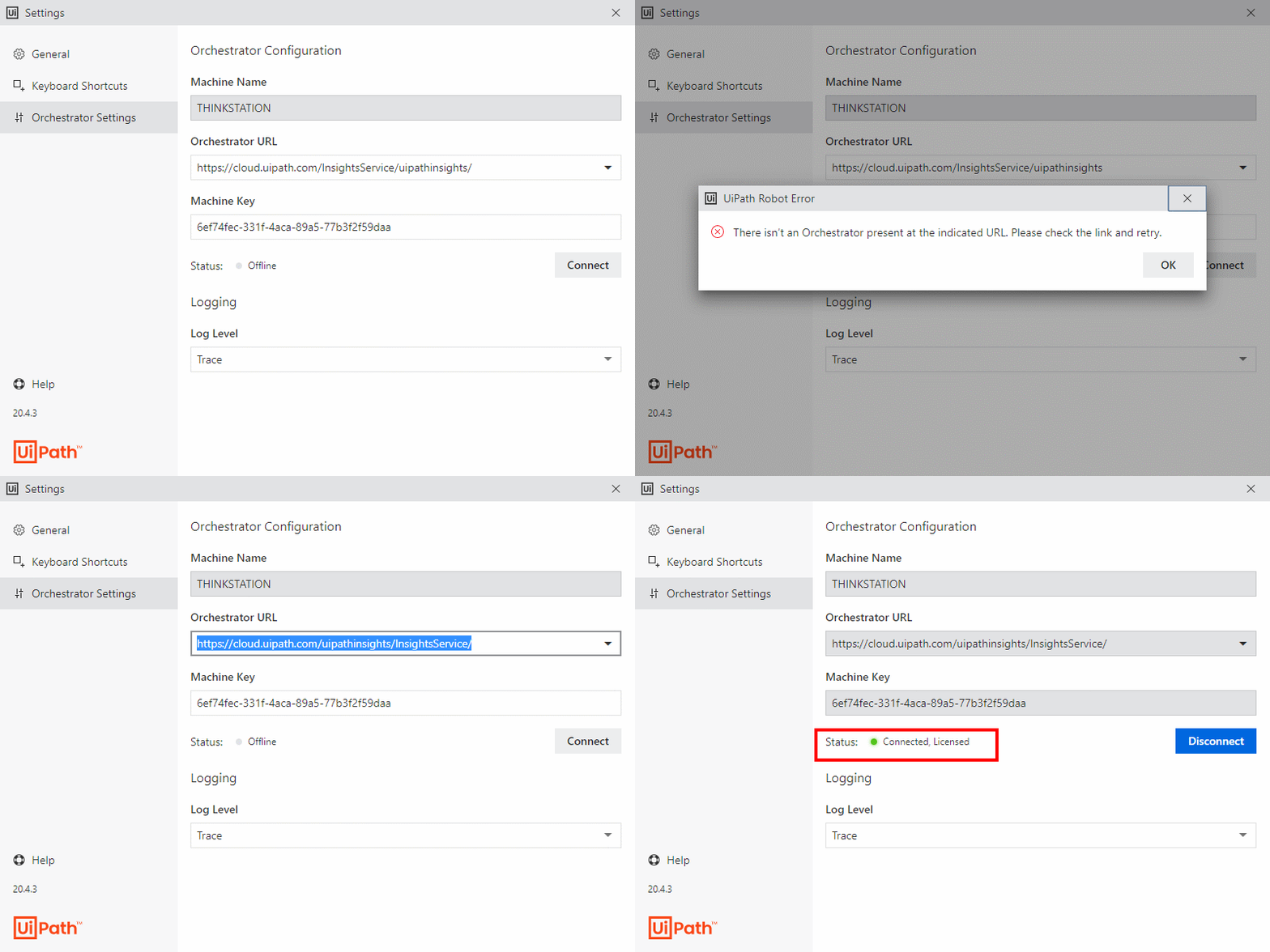
UiPath Orchestrator isn't present

Quickly fix the UiPath Orchestrator isn’t present at the current URL error.

If the machine code is incorrect, the user will hit an invalid machine key error. Fortunately, correcting this error is as simple as copying the correct code from UiPath orchestrator into the corresponding field in UiPath Orcestrator.

UiPath Orchestrator URL

If the UiPath Orchestrator URL is the problem, you will need to check the format used to create the URL. The established syntax is:

https://cloud.uipath.com/ <accountlogicalname> / <servicename>/

The accountlogicalname is the name used to log into UiPath Orchestrator, and the servicename maps to the name of the UiPath tenant service.

The technical description may actually over-complicate the situation. The easiest way to get the correct URL is to to log into UiPath Orchestrator and copy everything before the term /orchestrator_/ occurs.

 UiPath Orchestrator isn’t present fix

In review, the steps to fix the error that says there isn’t an Orchestrator present at the indicated URL, simply:

  1. Open UiPath assistant
  2. Navigate to the Orchestrator settings page
  3. Copy the portion of the Orchestrator URL that precedes the token /orchestrator_/
  4. Paste this URL into the Orchestrator URL portion of UiPath Assistant
  5. Click the connect button and wait for the status to turn green
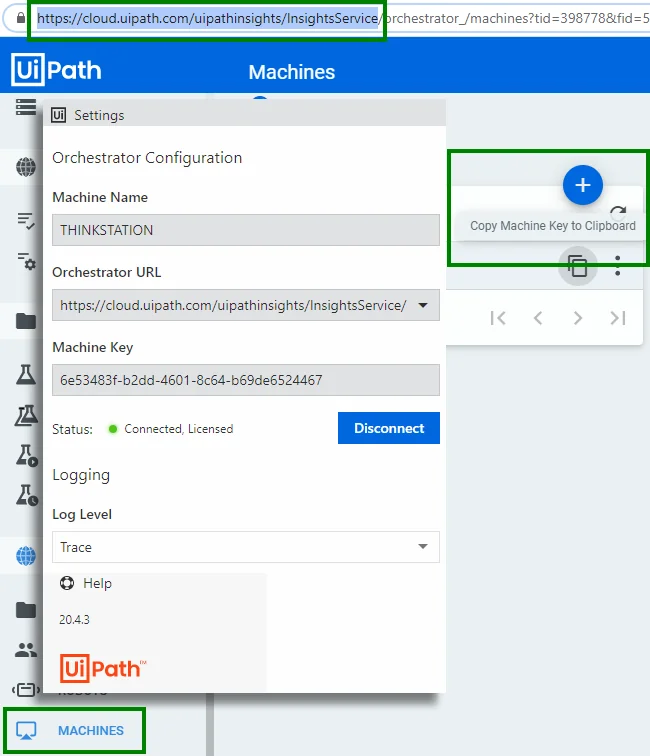
UiPath Assistant configuration

The UiPath assistance needs the administrative base URL and the machine key to connect to UiPath Orchestrator.

If the correct portion of the UiPath Orchestrator URL is copied from the web browser and pasted into the corresponding field in the UiPath Assistant, the ‘Orchestrator isn’t present’ error should go away. Just click connect, and watch the status code turn green.

With the connection established, publishing UiPath Studio projects to the cloud and managing RPA systems from Orchestrator should remain a problem free process.


Cameron McKenzie Cameron McKenzie is an AWS Certified AI Practitioner, Machine Learning Engineer, Solutions Architect and author of many popular books in the software development and Cloud Computing space. His growing YouTube channel training devs in Java, Spring, AI and ML has well over 30,000 subscribers.

Fix "There isn't an Orchestrator present" error with the right UiPath Orchestrator URL Fix “There isn’t an Orchestrator present” error with the right UiPath Orchestrator URL | TheServerSide.com Java, AI, Spring, Claude and Certifiations Fix "There isn't an Orchestrator present" error with the right UiPath Orchestrator URL

Java, Spring, AI, News & Certifications

Resolve UiPath Assistant's Orchestrator URL Error

Learn how to find the correct UiPath Orchestrator base URL, update the Assistant settings, and reconnect your machine.

In order for a robot managed through the cloud-based UiPath Orchestrator to run on a client machine, a connection between the two systems must be established through the UiPath Assistant tool. But if there’s a misconfiguration of the UiPath Orchestrator URL, the dreaded ‘Orchestrator isn’t present at the indicated URL’ error will occur, and the connection will fail to be established. Here’s how to fix that UiPath URL problem.

Learn UiPath RPA Quickly

Here’s how to learn UiPath and RPA:

  • Create a basic UiPath Hello World app
  • Create a UiPath robot in Orchestrator
  • Configure the UiPath Assistant to connect to Orchestrator
  • Build a UiPath orchestator process
  • Set UiPath triggers to run your unattended robots

You’ll be UiPath expert in no time!

UiPath’s URL

Two pieces of information are required to make this connection happen:

  • The hexadecimal machine code provided by Orchestrator
  • The correct URL to identify Orchestrator on the network
UiPath Orchestrator isn't present

Quickly fix the UiPath Orchestrator isn’t present at the current URL error.

If the machine code is incorrect, the user will hit an invalid machine key error. Fortunately, correcting this error is as simple as copying the correct code from UiPath orchestrator into the corresponding field in UiPath Orcestrator.

UiPath Orchestrator URL

If the UiPath Orchestrator URL is the problem, you will need to check the format used to create the URL. The established syntax is:

https://cloud.uipath.com/ <accountlogicalname> / <servicename>/

The accountlogicalname is the name used to log into UiPath Orchestrator, and the servicename maps to the name of the UiPath tenant service.

The technical description may actually over-complicate the situation. The easiest way to get the correct URL is to to log into UiPath Orchestrator and copy everything before the term /orchestrator_/ occurs.

 UiPath Orchestrator isn’t present fix

In review, the steps to fix the error that says there isn’t an Orchestrator present at the indicated URL, simply:

  1. Open UiPath assistant
  2. Navigate to the Orchestrator settings page
  3. Copy the portion of the Orchestrator URL that precedes the token /orchestrator_/
  4. Paste this URL into the Orchestrator URL portion of UiPath Assistant
  5. Click the connect button and wait for the status to turn green
UiPath Assistant configuration

The UiPath assistance needs the administrative base URL and the machine key to connect to UiPath Orchestrator.

If the correct portion of the UiPath Orchestrator URL is copied from the web browser and pasted into the corresponding field in the UiPath Assistant, the ‘Orchestrator isn’t present’ error should go away. Just click connect, and watch the status code turn green.

With the connection established, publishing UiPath Studio projects to the cloud and managing RPA systems from Orchestrator should remain a problem free process.


Cameron McKenzie Cameron McKenzie is an AWS Certified AI Practitioner, Machine Learning Engineer, Solutions Architect and author of many popular books in the software development and Cloud Computing space. His growing YouTube channel training devs in Java, Spring, AI and ML has well over 30,000 subscribers.