

Kubernetes interviews get much more interesting once the questions move beyond definitions such as "What is a Pod?" or "What is a Service?"
For experienced developers and platform engineers, the better questions test whether you can diagnose manifests, reason about service discovery, understand Pod lifecycle behavior, protect sensitive configuration and control where workloads run.
The following questions focus on practical Kubernetes knowledge rather than memorized terminology.
Why won't this Service send traffic to the Deployment's Pods?
Consider this Deployment and Service:
apiVersion: apps/v1
kind: Deployment
metadata:
  name: my-deployment
spec:
  replicas: 3
  selector:
    matchLabels:
      type: example
      color: red
  template:
    metadata:
      labels:
        type: example
        color: red
    spec:
      containers:
        - name: echocolor
          image: reselbob/echocolor:v0.1
          ports:
            - containerPort: 3000
          env:
            - name: COLOR_ECHO_COLOR
              value: RED
            - name: COLOR_ECHO_VERSION
              value: V1
---
apiVersion: v1
kind: Service
metadata:
  name: my-service
spec:
  selector:
    type: example
    color: blue
  ports:
    - protocol: TCP
      port: 3000
      targetPort: 3000
  type: NodePort
The Service selector does not match the Pod labels.
The Pods have:
type: example
color: red
but the Service looks for:
type: example
color: blue
A selector-based Service targets Pods whose labels match the Service's selector. Because color differs, this Service has no matching application Pods.
Fix the selector:
selector:
  type: example
  color: red
You can confirm the result with:
kubectl get pods --show-labels
kubectl get service my-service
kubectl get endpointslices \
  -l kubernetes.io/service-name=my-service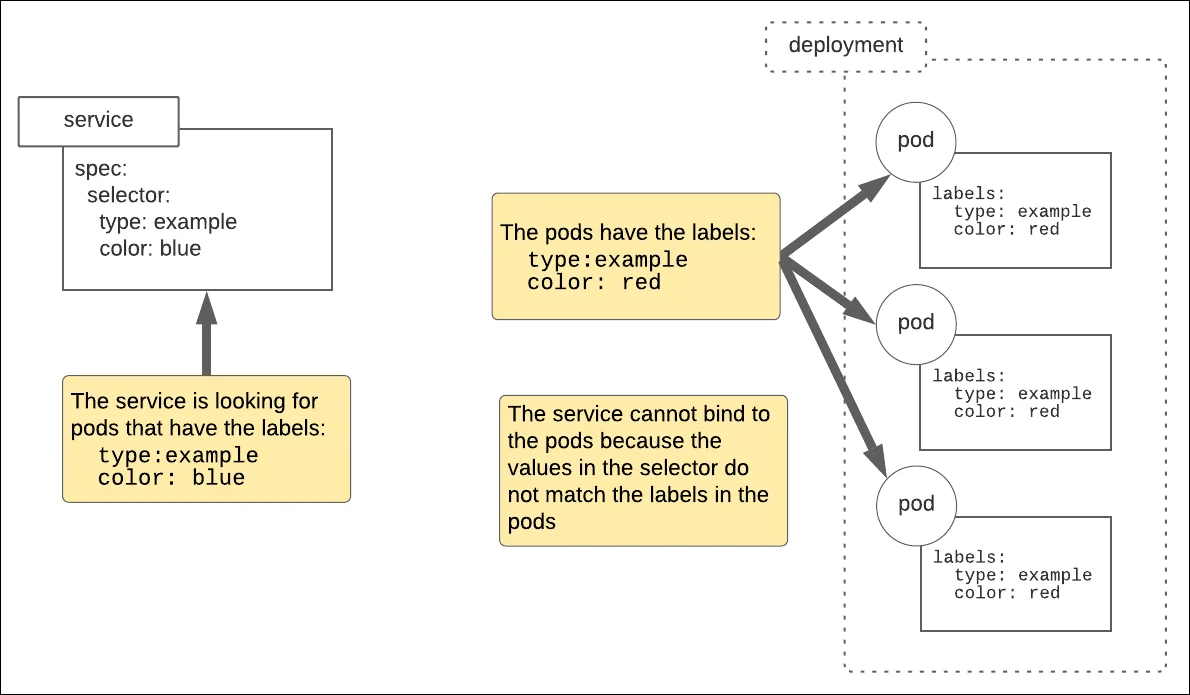
What is an init container and when would you use one?
An init container runs before the regular application containers in a Pod. Regular init containers run to completion in order, which makes them useful for startup preparation tasks.
Common uses include:
- waiting for a dependency to become reachable;
- generating configuration files;
- performing permissions or filesystem setup; and
- copying assets into a shared volume.
This Pod waits for a Service named redis-master before starting its main container:
apiVersion: v1
kind: Pod
metadata:
  name: myapp-pod
  labels:
    app: myapp
spec:
  initContainers:
    - name: wait-for-redis
      image: busybox:1.37
      command:
        - sh
        - -c
        - >
          until nslookup redis-master;
          do echo "waiting for redis-master"; sleep 2;
          done
  containers:
    - name: myapp-container
      image: busybox:1.37
      command:
        - sh
        - -c
        - echo "The app is running!" && sleep 3600
The application container does not start until the init container completes successfully.
What's the difference between a ConfigMap and a Secret?
A ConfigMap stores non-confidential configuration data. A Secret is intended for sensitive information such as passwords, tokens and private keys.
A ConfigMap might look like this:
apiVersion: v1
kind: ConfigMap
metadata:
  name: db-config
data:
  database: mongodb
  database_uri: mongodb://localhost:27017
  app.properties: |
    maximum.connections=5
    timeout=10000
A Secret can store similar key-value data:
apiVersion: v1
kind: Secret
metadata:
  name: db-credentials
type: Opaque
data:
  username: YWRtaW4=
  password: MWYyZDFlMmU2N2Rm
The critical interview point is that those values are Base64 encoded, not encrypted. Base64 provides no confidentiality by itself.
Clusters can be configured to encrypt Secret data at rest, but access control is still essential. RBAC should restrict which users, service accounts and Pods can read Secrets.
What is a Kubernetes Operator?
An Operator is a Kubernetes pattern that combines custom resources with controller logic to automate application-specific operational knowledge.
A normal controller understands built-in Kubernetes resources such as Deployments. An Operator can understand a domain-specific resource such as a database cluster, message broker or backup policy and continuously reconcile the real system toward the desired state.
An Operator might automate tasks such as:
- initial deployment;
- scaling;
- configuration changes;
- backup and restore;
- failover; and
- version upgrades.
The key idea is not merely that an Operator creates several resources at once. It encodes operational behavior in a Kubernetes controller.
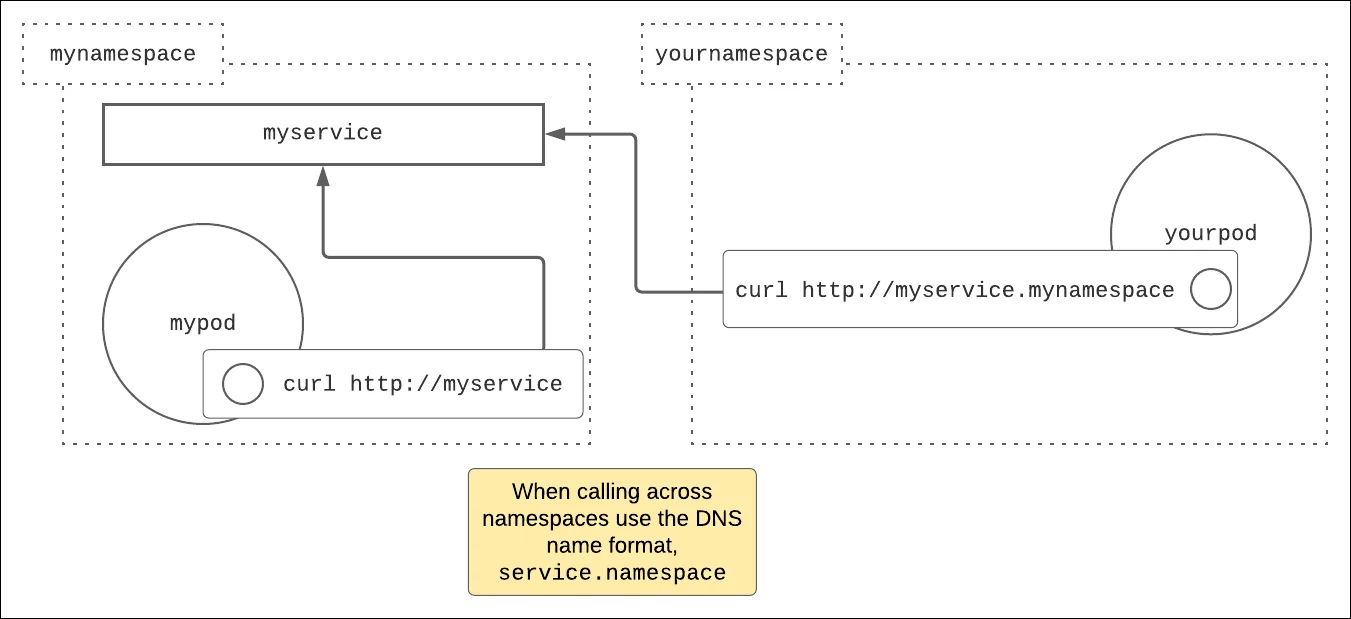
How does internal Kubernetes service discovery work?
Kubernetes cluster DNS creates DNS records for Services.
Within the same namespace, a Pod can normally reach a Service by its short name:
https://myserviceAcross namespaces, use a namespace-qualified name:
https://myservice.mynamespaceThe fully qualified Service name normally follows this pattern:
myservice.mynamespace.svc.cluster.localThe cluster domain is commonly cluster.local, but it can be configured differently.
What does kubelet do?
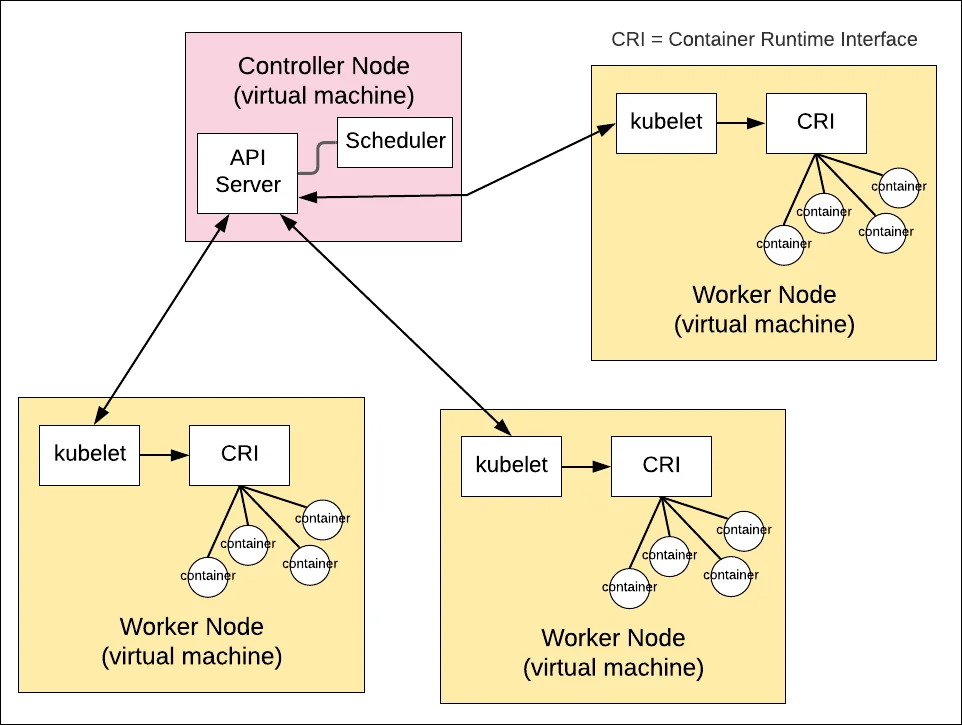
The kubelet is the node agent that runs on each Kubernetes node. It watches for Pod specifications assigned to that node and works with the container runtime through the Container Runtime Interface to make the requested containers run.
The scheduler decides where a Pod should run. Once a Pod is bound to a node, the kubelet on that node is responsible for realizing and monitoring the Pod according to its specification.
What is Kubernetes RBAC?
Role-based access control determines which subjects can perform which actions on Kubernetes API resources.
The four objects you should know are:
Rolefor namespaced permissions;ClusterRolefor cluster-scoped or reusable permissions;RoleBindingto grant a Role or ClusterRole inside a namespace; andClusterRoleBindingto grant a ClusterRole across the cluster.
A Role might permit reading Pods:
apiVersion: rbac.authorization.k8s.io/v1
kind: Role
metadata:
  name: pod-reader
  namespace: default
rules:
  - apiGroups: [""]
    resources: ["pods"]
    verbs: ["get", "list", "watch"]
What's the difference between a StatefulSet and a DaemonSet?
A StatefulSet manages stateful Pods that need stable identities, ordered behavior and often persistent storage. Its Pods receive stable names such as db-0, db-1 and db-2.
A DaemonSet ensures that eligible nodes run a copy of a Pod. Common uses include:
- log collectors;
- node monitoring agents;
- networking components; and
- storage agents.
The difference is therefore not simply "persistent data vs. one Pod per node." StatefulSets manage ordered, identity-sensitive workloads. DaemonSets place a workload on each eligible node.
What is a sidecar container?
A sidecar is a supporting container that runs alongside the main application container in the same Pod. It can provide logging, monitoring, proxying, security or data synchronization without embedding that logic into the main application.
Modern Kubernetes also supports native sidecar containers as restartable init containers. A sidecar declared under initContainers with restartPolicy: Always remains running for the life of the Pod.
apiVersion: v1
kind: Pod
metadata:
  name: app-with-sidecar
spec:
  initContainers:
    - name: log-sidecar
      image: busybox:1.37
      restartPolicy: Always
      command:
        - sh
        - -c
        - tail -F /var/log/app.log
      volumeMounts:
        - name: logs
          mountPath: /var/log
  containers:
    - name: app
      image: busybox:1.37
      command:
        - sh
        - -c
        - >
          while true;
          do date >> /var/log/app.log; sleep 5;
          done
      volumeMounts:
        - name: logs
          mountPath: /var/log
  volumes:
    - name: logs
      emptyDir: {}
The application and sidecar share the Pod's network namespace and can also share volumes, as this example does.
How do you schedule a Pod onto specific nodes?
Kubernetes provides several mechanisms, including nodeSelector, node affinity, taints and tolerations.
For more expressive scheduling requirements, node affinity is a common choice.
First label a node:
kubectl label node worker-01 nodelocation=usaThen require Pods in a Deployment to run on nodes with that label:
apiVersion: apps/v1
kind: Deployment
metadata:
  name: nginx-deployment
spec:
  replicas: 5
  selector:
    matchLabels:
      app: nginx
  template:
    metadata:
      labels:
        app: nginx
    spec:
      affinity:
        nodeAffinity:
          requiredDuringSchedulingIgnoredDuringExecution:
            nodeSelectorTerms:
              - matchExpressions:
                  - key: nodelocation
                    operator: In
                    values:
                      - usa
      containers:
        - name: nginx
          image: nginx:1.30-alpine
          ports:
            - containerPort: 80
The scheduler only places these Pods on nodes whose labels satisfy the required node-affinity rule.
What other hands-on Kubernetes questions should you expect?
A strong technical interview may also ask you to explain or troubleshoot:
- readiness, liveness and startup probes;
- requests, limits and Pod scheduling;
- taints and tolerations;
- PersistentVolumes and PersistentVolumeClaims;
- Ingress or Gateway API routing;
- rolling updates and rollback behavior;
- CrashLoopBackOff and Pending Pods;
- NetworkPolicy;
- Horizontal Pod Autoscaling; and
- the difference between Jobs, CronJobs, Deployments, StatefulSets and DaemonSets.
The best Kubernetes interview answers combine concepts with operational reasoning. An interviewer is often less interested in whether you memorized a definition than whether you can explain what Kubernetes will actually do when a manifest is applied to a real cluster.