

The Gitflow release branch is created when the develop branch is feature complete and the team is ready to prepare a new production release. It has a deliberately short lifespan: create it from develop, perform final testing and release-related fixes, finish the release, and then delete the branch.
No new feature development should happen on a release branch. Once the branch exists, commits should be limited to bug fixes, documentation changes, version updates and other work required to make the release production-ready.
How the Gitflow release branch works
A typical Gitflow release follows this sequence:
- Feature branches are completed and merged into
develop. - A release branch is created from
develop. - Final testing and release-specific fixes happen on the release branch.
- The release branch is merged into
masterormain. - The release is tagged with its version number.
- The release branch is merged back into
developso release fixes are retained. - The release branch is deleted.
The classic Gitflow tooling uses master by default, although repositories that use main can configure Gitflow accordingly.
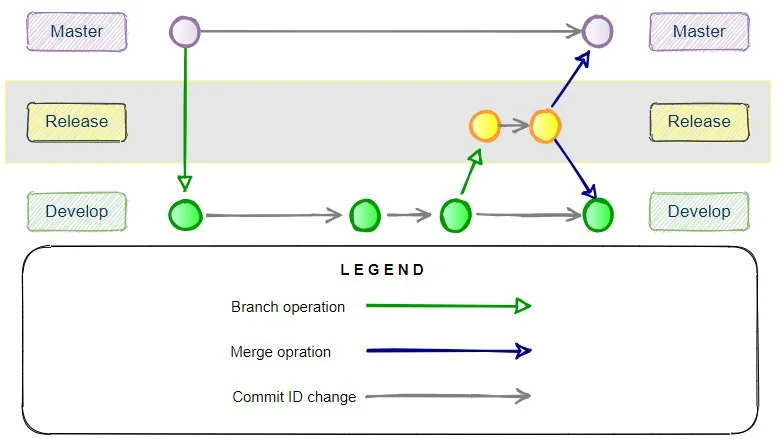
The Gitflow release branch is created from develop and ultimately merged into both the production and development branches.
Gitflow release branch vs. hotfix branch
Release and hotfix branches can both ultimately affect the production branch, but they begin from different places and solve different problems.
A release branch starts from develop when a planned version is ready for final testing. A hotfix starts from master or main when an urgent production problem must be corrected immediately.
Gitflow release branch example
The following commands demonstrate a complete Gitflow release lifecycle.
First, initialize Gitflow in an existing Git repository:
git flow initGitflow asks several configuration questions. If you accept the traditional defaults, the primary branches are master for production releases and develop for ongoing development.
Check the branches and tags:
git branch
git tag
A newly initialized example might look like this:
* develop
  master
Complete feature development first
Release branches should not contain new feature development. Features should be completed and merged into develop before the release begins.
For example, create a feature branch:
git flow feature start feature_branchAfter development and commits are complete, finish the feature:
git flow feature finish feature_branchGitflow merges the completed feature into develop and removes the feature branch. At this point, develop contains the functionality intended for the upcoming release.
Start the Gitflow release branch
When development is feature complete, create a release branch and give it the version number of the planned release:
git flow release start 0.1.0Gitflow creates release/0.1.0 from develop and switches the working tree to the new branch.
Switched to a new branch 'release/0.1.0'You can verify the branch with:
git branchThe repository should now contain three primary branches:
  develop
  master
* release/0.1.0
Make release-specific fixes
Final testing happens while the release branch exists. If testing discovers a problem, fix it on the release branch and commit the change normally.
git add .
git commit -m "Fix issue found during release testing"
Version numbers, release documentation and other release-specific metadata can also be updated here. New application features, however, should wait for a future development cycle.
Finish the Gitflow release
When testing is complete and the release is ready for production, finish it:
git flow release finish 0.1.0The exact output depends on the Gitflow implementation and repository configuration, but the finish operation performs the important lifecycle work: it merges the release into the production branch, creates the release tag, merges the release changes back into develop, and removes the release branch.
If Git opens an editor for merge or tag messages, save the supplied message and close the editor so the operation can continue.
Verify the finished release
After the release finishes, inspect the remaining branches and tags:
git branch
git tag
The release branch should be gone, while the version tag remains:
* develop
  master

0.1.0
The production branch now contains the released code, while develop contains any fixes made during the release process.
Push the Gitflow release to the remote repository
Finishing a release changes the local repository. If the project uses a shared remote such as origin, push the updated branches and the release tag.
git push origin master
git push origin develop
git push origin 0.1.0
You can also push all local tags with:
git push origin --tagsIf your repository uses main instead of master, substitute main in the appropriate commands.
Gitflow release branch process overview
The important characteristics of the Gitflow release branch are:
- It is created from the
developbranch. - It represents a feature-complete version of the application.
- It is intended for final testing, bug fixes and release preparation.
- New feature development does not belong on the release branch.
- The finished release is merged into the production branch and tagged.
- Release changes are also merged back into
develop. - The release branch is deleted after the release is finished.
The result is a controlled transition from active development to a versioned production release without losing fixes discovered during final testing.
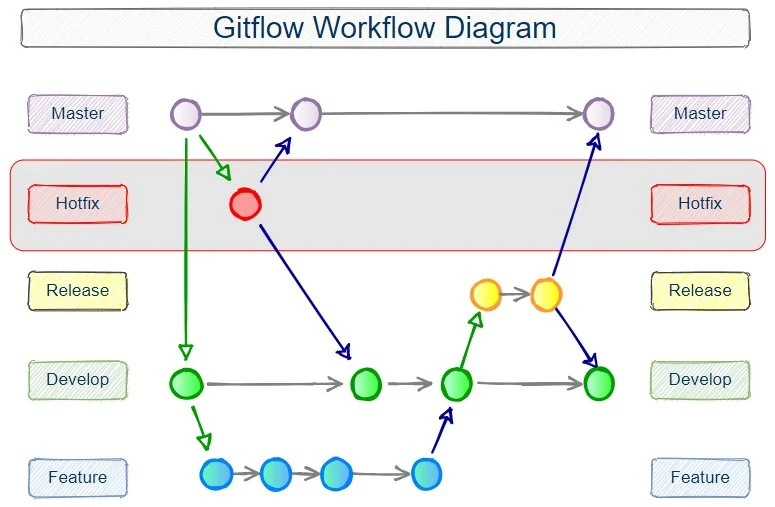
A complete Gitflow workflow includes feature, release and hotfix branches around the long-lived development and production branches.