

If distributed version control is your thing, you need to master the intricacies of the files on your working tree, and that means you must learn the Git status commands and understand the information it can provide.
The goal of the Git status command is to provide you information about the state of the various files in your working directory, also known as the working tree. The six different states the Git status command can inform you of are:
- There is no commit history
- There are untracked files
- There are changes to be committed
- The working tree is clean
- Files have been modified
- Files have been deleted
How to use the Git status command
To really learn how to use the Git status command, follow these steps:
- Issue a git init command to create a new repository
- Issue the git status command and note the results
- Add a new file named index.html to the repository
- Issue the git status command and inspect the results
- Issue a git add . command
- Run the git status command and note the results
- Issue a Git commit
- Run the git status command and inspect the results
- Modify the index.html file
- View the results of the git status command
- Delete the index.html file
- Inspect the results of the git status command
Going through this cycle of git status commands will demonstrate each of the states the tool will report upon.
Nothing to commit status
When a new repository is created, the git status command reports there is nothing to commit:
<span style="color: #003366">$ git init</span>

<span style="color: #999999">Initialized empty Git repository in C:/_bart/.git/</span>


<span style="color: #003366">$ git status</span>

<span style="color: #999999">On branch feature No commits yet

nothing to commit (create/copy files and use "git add" to track)</span>
Untracked git status
When new files are added to a repository, git status reports untracked files
<span style="color: #003366">$ touch index.html


$ git status</span>

<span style="color: #999999">On branch feature No commits yet

Untracked files:

    index.html

    nothing added to commit but untracked files present (use "git add" to track)</span>
Changes to be committed git status
When new files are added to the index, the git status reports changes to be committed:
<span style="color: #003366">$ git add index.html


$ git status</span>

<span style="color: #999999">On branch feature No commits yet

Changes to be committed:

    (use "git rm --cached <file>..." to unstage)

    new file:   index.html</span>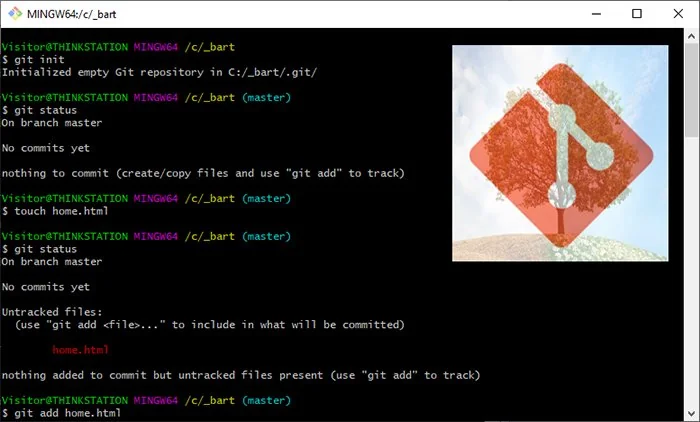
This git status command example will help you understand the various states of files under version control
Clean working tree status
After a commit, the git status will report a clean working tree. This can also be triggered by running a git clean command:
<span style="color: #003366">$ git commit -m "Git status and working tree commit"</span>

<span style="color: #999999">[feature (root-commit) 1159b26] Git status and working tree commit

  1 file changed, 0 insertions(+), 0 deletions(-)

  create mode 134221 index.html

$ git status

On branch feature

nothing to commit, working tree clean</span>
Modified git status
If a file is edited the status reported will be modified:
<span style="color: #003366">$ echo "Hello World" >> index.html


$ git status</span>

<span style="color: #999999">On branch feature

Changes not staged for commit:

  (use "git add <file>..." to update what will be committed)

  (use "git checkout -- <file>..." to discard changes in working directory)

    modified:   index.html

    no changes added to commit (use "git add" and/or "git commit -a")</span>
And finally, if you remove a file, the git status will report that a file has been deleted:
<span style="color: #003366">$ rm index.html


$ git status</span>

<span style="color: #999999">On branch feature Changes not staged for commit:

   (use "git add/rm <file>..." to update what will be committed)

   (use "git checkout -- <file>..." to discard changes in working directory)

      deleted:    index.html</span>
And those are the ‘ins and outs’ of the git status command. Learn these various different statuses, and you will be a master of the command.
 Cameron McKenzie is an AWS Certified AI Practitioner, Machine Learning Engineer, Solutions Architect and author of many popular books in the software development and Cloud Computing space. His growing YouTube channel training devs in Java, Spring, AI and ML has well over 30,000 subscribers.
| Git, GitHub & GitHub Copilot Certification Made Easy |
|---|
| Want to get certified on the most popular AI, ML & DevOps technologies of the day? These five resources will help you get GitHub certified in a hurry.
Get certified in the latest AI, ML and DevOps technologies. Advance your career today. |