

Git does not provide a special git clone command that accepts an arbitrary commit ID and checks out only that commit. The normal git clone command clones a repository, after which you can check out, switch to, or create a branch from the commit you need.
For most developers, the simplest way to work with a specific commit is:
- Clone the repository.
- Change into the repository directory.
- Check out the desired commit.
git clone https://github.com/cameronmcnz/rock-paper-scissors.git
cd rock-paper-scissors
git switch --detach fcbd92b
The git switch --detach command places the repository at the requested commit without moving an existing branch. This detached HEAD state is ideal if your goal is simply to inspect, build, test or run an older version of the project.
How to clone a specific Git commit
Suppose the commit you want has the short SHA fcbd92b. Clone the repository normally:
git clone https://github.com/cameronmcnz/rock-paper-scissors.git
cd rock-paper-scissors
Then inspect the recent history if you need to locate the commit:
git log --oneline -n 5A shortened log might look like this:
3ab3c6f Added stage to Jenkinsfile
1d1bbfc Fixed Jenkinsfile
fcbd92b Update Jenkinsfile
326f527 Merge remote-tracking branch 'origin/master'
84ff492 Create rita.txt
Once you know the commit ID, switch directly to it:
git switch --detach fcbd92bYour working tree now contains the files exactly as they existed at that commit.
Detached HEAD vs. creating a branch
A detached HEAD is perfectly acceptable when you only want to examine or test an old revision. However, if you intend to edit the project and keep those changes, create a branch from the commit instead.
git switch -c specific-commit-branch fcbd92bThis single command creates specific-commit-branch at commit fcbd92b and switches to it immediately.
You can verify the result with:
git log --oneline --decorate -n 3The output will show HEAD pointing to the new branch at the selected commit.
fcbd92b (HEAD -> specific-commit-branch) Update Jenkinsfile
326f527 Merge remote-tracking branch 'origin/master'
84ff492 Create rita.txt
This branch-based approach is generally the better choice if you plan to make new commits or eventually push your work to a remote repository.
Can you use git reset instead?
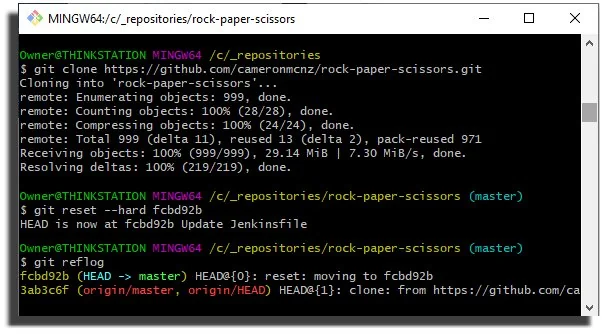
Yes. Another approach is to clone the repository and perform a hard reset to the desired commit:
git clone https://github.com/cameronmcnz/rock-paper-scissors.git
cd rock-paper-scissors
git reset --hard fcbd92b
The git reset --hard command moves the current branch to the specified commit and makes the index and working tree match it.
That is an important difference from git switch --detach. A hard reset actually moves the current branch reference. It can also discard uncommitted changes. For those reasons, a detached checkout is usually safer when you only want to inspect an old commit.
Clone a specific branch first
If you already know which branch contains the commit, you can clone only that branch:
git clone --branch master --single-branch \
  https://github.com/cameronmcnz/rock-paper-scissors.git

cd rock-paper-scissors
git switch --detach fcbd92b
The --single-branch option limits the clone to the history associated with the selected branch. It does not mean Git downloads only one commit.
Shallow clone a repository
If the real goal is to reduce download size, use a shallow clone. The --depth option limits how much commit history Git initially downloads.
git clone --depth 5 \
  https://github.com/cameronmcnz/rock-paper-scissors.git
This creates a shallow repository containing only a limited portion of the branch history.
If the desired commit is included in that history, you can switch to it normally:
cd rock-paper-scissors
git switch --detach fcbd92b
If Git reports that the commit is unknown, the commit probably falls outside the history downloaded by the shallow clone. Deepen the repository and try again:
git fetch --deepen=50
git switch --detach fcbd92b
Or convert the shallow repository into a complete clone:
git fetch --unshallowCan Git clone only one arbitrary commit?
Not in the general sense implied by a command such as git clone <url> <commit>. Git's clone operation is repository and reference oriented. An arbitrary commit SHA is not a normal clone target.
If the commit is the tip of a known branch or tag, you can minimize the download by cloning that reference with a shallow depth. For example:
git clone --depth 1 --branch main \
  https://github.com/example/project.git
That retrieves the current tip of main with minimal history. It does not provide a general mechanism for cloning any historical commit by SHA.
Best way to work with a specific Git commit
Choose the command based on what you plan to do after the clone:
| Goal | Recommended command |
|---|---|
| Inspect or test an old commit | git switch --detach <commit> |
| Start new work from an old commit | git switch -c <branch> <commit> |
| Move the current branch backward | git reset --hard <commit> |
| Reduce clone history | git clone --depth <n> |
| Clone only one branch | git clone --single-branch --branch <branch> |
For most cases, the modern and least destructive solution is simple: clone the repository and use git switch --detach to inspect a specific commit, or git switch -c if you want to start new work from that point in history.