Java

Five Essential Java Testing Frameworks and Tools

Use JUnit, Cucumber, REST Assured, Selenium and JMeter to test Java applications from individual methods through APIs, browsers and production-scale workloads.

A Java application needs more than unit tests before it is ready for production. Modern test suites typically cover individual classes, business behavior, HTTP APIs, browser workflows and performance under load.

Five tools cover those layers particularly well:

  • JUnit for unit and developer tests;
  • Cucumber for behavior-driven development and executable specifications;
  • REST Assured for REST API testing;
  • Selenium WebDriver for browser automation; and
  • Apache JMeter for load and performance testing.

1. JUnit for Java unit testing

JUnit should be the default starting point for most Java developers. JUnit 6 is the current generation of the framework and runs on Java 17 or newer. It provides assertions, lifecycle callbacks, parameterized tests, nested tests, extensions, conditional execution, timeouts and parallel execution through the JUnit Platform.

TestNG remains a capable alternative, especially for existing suites that depend heavily on TestNG features. However, the old claim that TestNG is simply better than JUnit is no longer a useful recommendation. Modern JUnit covers the needs of most new Java test suites while integrating naturally with Maven, Gradle, IDEs and other testing frameworks.

import static org.junit.jupiter.api.Assertions.assertEquals;

import org.junit.jupiter.api.Test;

class CalculatorTest {

    @Test
    void addsTwoNumbers() {
        assertEquals(4, 2 + 2);
    }
}
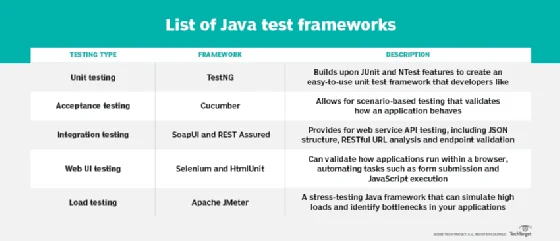
List of Java testing frameworks

2. Cucumber for behavior-driven development

Cucumber tests application behavior through scenarios written in Gherkin. The readable Given, When and Then structure makes scenarios useful as both automated tests and executable descriptions of business behavior.

Cucumber-JVM integrates with the Java ecosystem and can run on the JUnit Platform. It is particularly useful when developers, testers and domain experts need a shared vocabulary for acceptance criteria.

Feature: Shopping cart

  Scenario: Add a product to the cart
    Given the shopping cart is empty
    When the customer adds a keyboard
    Then the cart should contain 1 item

3. REST Assured for Java API testing

REST Assured provides a Java DSL for testing HTTP and REST APIs. Tests can send requests, inspect status codes, validate headers and assert values in JSON responses without requiring a browser.

It is a strong choice for integration tests around Spring Boot REST controllers, microservices and other HTTP endpoints.

import static io.restassured.RestAssured.given;
import static org.hamcrest.Matchers.equalTo;

given()
    .baseUri("https://localhost:8080")
.when()
    .get("/api/status")
.then()
    .statusCode(200)
    .body("status", equalTo("UP"));

SOAP services still exist, and tools such as SoapUI remain useful when a project specifically needs SOAP or broader interactive API testing. For a Java-focused REST test suite, however, REST Assured fits naturally alongside the application's Java test code.

4. Selenium WebDriver for browser testing

Selenium WebDriver automates real browsers and is the better centerpiece for end-to-end browser testing. It can verify workflows involving navigation, forms, JavaScript, authentication and other behavior that users experience through Chrome, Firefox, Edge and other supported browsers.

HtmlUnit remains useful for lightweight headless scenarios, but it does not replace testing in a real browser. For cross-browser regression and end-to-end testing, Selenium is the more important tool for Java developers to know.

WebDriver driver = new ChromeDriver();

try {
    driver.get("https://example.com");

    String title = driver.getTitle();

    assertEquals("Example Domain", title);
} finally {
    driver.quit();
}
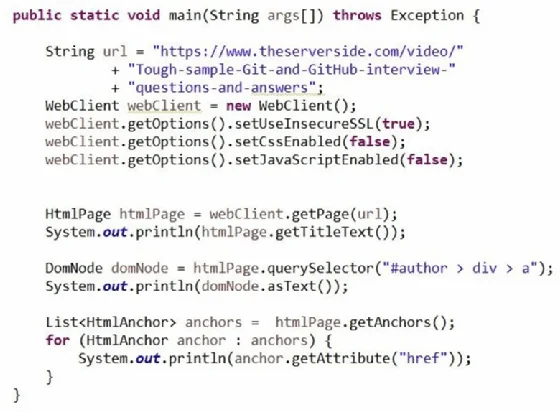
Browser testing frameworks for Java
Browser-level tests verify behavior that unit and API tests cannot.

5. Apache JMeter for load and performance testing

Functional correctness is only part of software quality. An application can pass every unit and integration test and still fail when hundreds or thousands of users arrive at the same time.

Apache JMeter is designed for load and performance testing. It can generate concurrent requests, exercise HTTP APIs and other protocols, collect response-time metrics and help teams identify performance bottlenecks before a release reaches production.

JMeter can run with a graphical interface while a test plan is being developed, but serious load tests should normally run in non-GUI mode so the JMeter interface itself does not consume resources needed by the test.

Which Java testing tool should you use?

Testing layer Recommended tool Primary purpose
Unit JUnit Fast tests of classes, methods and application logic
Behavior / acceptance Cucumber Business-readable scenarios and BDD
REST API REST Assured HTTP request and response validation
Browser / UI Selenium Real-browser workflow automation
Load / performance Apache JMeter Concurrency, throughput and response-time testing

These tools are complementary rather than competitors. A mature Java project might use JUnit for thousands of fast developer tests, REST Assured for service endpoints, a smaller set of Cucumber scenarios for important business workflows, Selenium for critical browser journeys and JMeter for capacity testing.

The goal is not to maximize the number of testing frameworks in a project. Use the lowest and fastest testing layer that can prove a behavior, and reserve slower browser and load tests for problems that genuinely require them.

5 Java testing frameworks and tools developers should know 5 Java testing frameworks and tools developers should know | TheServerSide.com Java, AI, Spring, Claude and Certifiations 5 Java testing frameworks and tools developers should know

Java

Five Essential Java Testing Frameworks and Tools

Use JUnit, Cucumber, REST Assured, Selenium and JMeter to test Java applications from individual methods through APIs, browsers and production-scale workloads.

A Java application needs more than unit tests before it is ready for production. Modern test suites typically cover individual classes, business behavior, HTTP APIs, browser workflows and performance under load.

Five tools cover those layers particularly well:

  • JUnit for unit and developer tests;
  • Cucumber for behavior-driven development and executable specifications;
  • REST Assured for REST API testing;
  • Selenium WebDriver for browser automation; and
  • Apache JMeter for load and performance testing.

1. JUnit for Java unit testing

JUnit should be the default starting point for most Java developers. JUnit 6 is the current generation of the framework and runs on Java 17 or newer. It provides assertions, lifecycle callbacks, parameterized tests, nested tests, extensions, conditional execution, timeouts and parallel execution through the JUnit Platform.

TestNG remains a capable alternative, especially for existing suites that depend heavily on TestNG features. However, the old claim that TestNG is simply better than JUnit is no longer a useful recommendation. Modern JUnit covers the needs of most new Java test suites while integrating naturally with Maven, Gradle, IDEs and other testing frameworks.

import static org.junit.jupiter.api.Assertions.assertEquals;

import org.junit.jupiter.api.Test;

class CalculatorTest {

    @Test
    void addsTwoNumbers() {
        assertEquals(4, 2 + 2);
    }
}
List of Java testing frameworks

2. Cucumber for behavior-driven development

Cucumber tests application behavior through scenarios written in Gherkin. The readable Given, When and Then structure makes scenarios useful as both automated tests and executable descriptions of business behavior.

Cucumber-JVM integrates with the Java ecosystem and can run on the JUnit Platform. It is particularly useful when developers, testers and domain experts need a shared vocabulary for acceptance criteria.

Feature: Shopping cart

  Scenario: Add a product to the cart
    Given the shopping cart is empty
    When the customer adds a keyboard
    Then the cart should contain 1 item

3. REST Assured for Java API testing

REST Assured provides a Java DSL for testing HTTP and REST APIs. Tests can send requests, inspect status codes, validate headers and assert values in JSON responses without requiring a browser.

It is a strong choice for integration tests around Spring Boot REST controllers, microservices and other HTTP endpoints.

import static io.restassured.RestAssured.given;
import static org.hamcrest.Matchers.equalTo;

given()
    .baseUri("https://localhost:8080")
.when()
    .get("/api/status")
.then()
    .statusCode(200)
    .body("status", equalTo("UP"));

SOAP services still exist, and tools such as SoapUI remain useful when a project specifically needs SOAP or broader interactive API testing. For a Java-focused REST test suite, however, REST Assured fits naturally alongside the application's Java test code.

4. Selenium WebDriver for browser testing

Selenium WebDriver automates real browsers and is the better centerpiece for end-to-end browser testing. It can verify workflows involving navigation, forms, JavaScript, authentication and other behavior that users experience through Chrome, Firefox, Edge and other supported browsers.

HtmlUnit remains useful for lightweight headless scenarios, but it does not replace testing in a real browser. For cross-browser regression and end-to-end testing, Selenium is the more important tool for Java developers to know.

WebDriver driver = new ChromeDriver();

try {
    driver.get("https://example.com");

    String title = driver.getTitle();

    assertEquals("Example Domain", title);
} finally {
    driver.quit();
}
Browser testing frameworks for Java
Browser-level tests verify behavior that unit and API tests cannot.

5. Apache JMeter for load and performance testing

Functional correctness is only part of software quality. An application can pass every unit and integration test and still fail when hundreds or thousands of users arrive at the same time.

Apache JMeter is designed for load and performance testing. It can generate concurrent requests, exercise HTTP APIs and other protocols, collect response-time metrics and help teams identify performance bottlenecks before a release reaches production.

JMeter can run with a graphical interface while a test plan is being developed, but serious load tests should normally run in non-GUI mode so the JMeter interface itself does not consume resources needed by the test.

Which Java testing tool should you use?

Testing layer Recommended tool Primary purpose
Unit JUnit Fast tests of classes, methods and application logic
Behavior / acceptance Cucumber Business-readable scenarios and BDD
REST API REST Assured HTTP request and response validation
Browser / UI Selenium Real-browser workflow automation
Load / performance Apache JMeter Concurrency, throughput and response-time testing

These tools are complementary rather than competitors. A mature Java project might use JUnit for thousands of fast developer tests, REST Assured for service endpoints, a smaller set of Cucumber scenarios for important business workflows, Selenium for critical browser journeys and JMeter for capacity testing.

The goal is not to maximize the number of testing frameworks in a project. Use the lowest and fastest testing layer that can prove a behavior, and reserve slower browser and load tests for problems that genuinely require them.