

How to find the length of a Java String
Java's String.length() method returns the number of UTF-16 code units stored in a string.
For ordinary ASCII text, that usually corresponds to the number of visible characters:
String text = "Java";
int length = text.length();
System.out.println(length); // 4
The method signature is simple:
public int length()No argument is required, and the result is an int.
Java String length() example
String javaString = " String length example   ";
int stringSize = javaString.length();
System.out.println(stringSize);
Spaces at the beginning, end and middle of the string count toward its length.
Remove surrounding whitespace before checking length
Java's older trim() method removes leading and trailing characters whose value is less than or equal to U+0020. Since Java 11, strip() is generally a better choice when you want Unicode-aware whitespace handling.
Java 15 supports strip():
String text = "   Java String   ";
int length = text.strip().length();
System.out.println(length); // 11
If your application specifically needs the historical behavior of trim(), it remains available:
int length = text.trim().length();String length() vs. array length
A frequent Java mistake is confusing the String.length() method with an array's length field.
String text = "Java";
int stringLength = text.length();

int[] numbers = {1, 2, 3, 4};
int arrayLength = numbers.length;
The rule is:
String: calllength().- Array: read
length.
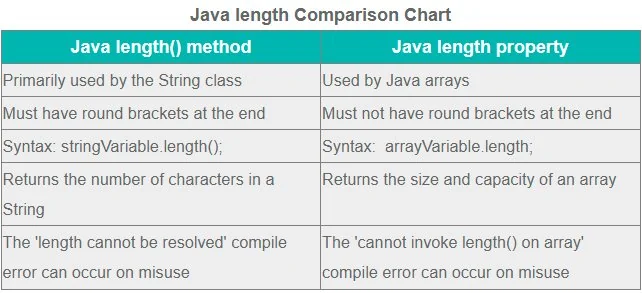
length(); arrays use length.Common Java String length errors
This does not compile:
String text = "Java";
int length = text.length;
String has a method named length(), not a field named length.
A second problem occurs when the reference is null:
String text = null;
int length = text.length(); // NullPointerException
Check for null when the source of the string may legitimately return no value:
int length = text == null ? 0 : text.length();String length and Unicode
The most important technical detail is that String.length() does not always equal the number of Unicode code points, and it definitely does not guarantee the number of symbols a person perceives on screen.
Java strings use UTF-16. Some Unicode characters require a surrogate pair and therefore occupy two UTF-16 code units.
String emoji = "😀";

System.out.println(emoji.length()); // 2
If you need the number of Unicode code points, use codePointCount():
String emoji = "😀";

int codePoints = emoji.codePointCount(
    0,
    emoji.length()
);

System.out.println(codePoints); // 1
Even code-point count is not always the same as the number of user-perceived characters because some visible symbols are composed from multiple code points.
Useful String methods related to length
| Method | Purpose |
|---|---|
length() |
Returns the number of UTF-16 code units. |
isEmpty() |
Returns true when length() == 0. |
isBlank() |
Returns true when the string is empty or contains only whitespace. |
strip() |
Removes leading and trailing Unicode whitespace. |
charAt(int) |
Returns the UTF-16 code unit at an index. |
substring(int) |
Returns part of a string. |
codePointCount(int, int) |
Counts Unicode code points in a range. |
Use length() in a palindrome check
Here's a compact Java 15-compatible example that uses length() and charAt() to determine whether a string is a palindrome:
static boolean isPalindrome(String text) {
    for (int left = 0, right = text.length() - 1;
         left < right;
         left++, right--) {
        if (text.charAt(left) != text.charAt(right)) {
            return false;
        }
    }
    return true;
}
For example:
boolean result = isPalindrome(
    "amanaplanacanalpanama"
);

System.out.println(result); // true
This iterative version is simpler than the older recursive example and avoids repeatedly creating substrings.
How to use Java String length()
For ordinary text, calling length() is all you need:
int length = text.length();Use strip().length() when surrounding Unicode whitespace should not count. Use codePointCount() when you need Unicode code points rather than UTF-16 code units, and remember that arrays use length without parentheses.