

Java 25 print vs println: What changed?
The fundamental difference between print and println has not changed: print leaves the cursor on the current line, while println terminates the line after it writes its value.
What has changed in Java 25 is how beginner-friendly programs can perform console I/O. Java 25 finalizes compact source files and instance main methods, and it introduces the java.lang.IO class. In a compact source file, you can call IO.print, IO.println and IO.printf without declaring a class or writing System.out.
Java 25 IO.println example
The IO.println method writes a value and then terminates the current line. Two calls therefore produce output on two lines:
void main() {
    IO.println("Vibe");
    IO.println("coding!");
}
The output is:
Vibe
coding!
Java 25 IO.print example
The IO.print method writes output without automatically terminating the line. Consecutive calls therefore continue on the same line:
void main() {
    IO.print("Vibe ");
    IO.print("coding!");
}
The result is:
Vibe coding!Java newline characters
You can explicitly put a line-feed escape sequence into text passed to IO.print. This works, although IO.println is clearer when the intent is simply to finish a line.
void main() {
    IO.print("Hello\n");
    IO.print("world!\n");
}
If you need platform-specific line separators while constructing a string, System.lineSeparator() remains available. For normal console output, however, println is usually the simplest choice.
When to use IO.print vs IO.println
Use IO.print when multiple operations should contribute to the same output line. Use IO.println when each value or message should finish the current line.
void main() {
    long x = 50;
    long y = 100;

    IO.print("The value of x is ");
    IO.print(x);
    IO.print(", and the value of y is ");
    IO.print(y);
    IO.println(".");
}
The output appears on one line:
The value of x is 50, and the value of y is 100.If the values should appear on separate lines, IO.println makes the intent obvious:
void main() {
    long x = 50;
    long y = 100;

    IO.println("The value of x is currently " + x + ".");
    IO.println("The value of y is currently " + y + ".");
}
Java 25 IO.printf example
Java 25's IO.printf method provides formatted output. Format specifiers such as %s and %d insert values, while %n emits the platform-appropriate line separator.
void main() {
    var name = "Cameron";
    var site = "TheServerSide";
    var articles = 100;

    IO.printf(
        "%s has written %d articles for %s.%n",
        name,
        articles,
        site
    );
}
The output is:
Cameron has written 100 articles for TheServerSide.What about System.out.println?
System.out.print, System.out.println and System.out.printf are still valid Java 25 APIs. Existing applications do not need to replace them. The new IO class is primarily intended to make simple programs and the first steps of learning Java less verbose.
For example, traditional Java remains perfectly valid:
public class HelloWorld {

    public static void main(String[] args) {
        System.out.println("Hello, World!");
    }
}
But Java 25 can express the same beginner program much more directly:
void main() {
    IO.println("Hello, World!");
}
Do not use console output as application logging
Neither IO.println nor System.out.println should replace a proper logging API in a production application. Console I/O is excellent for examples, command-line programs and simple diagnostics. Production software should normally use a logging framework or the logging facilities provided by its application platform.
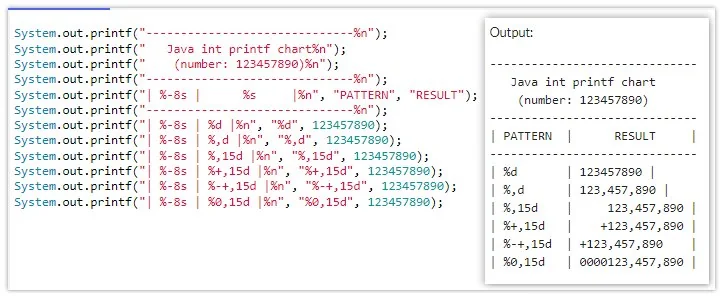
Java provides print, println and printf styles of output, and Java 25 makes them available through the concise IO API.