

How to format Java int and long values in Java 25
Java's familiar printf format specifiers still work in Java 25, but small console programs can now use a cleaner output style.
Java 25 introduces the java.lang.IO class for basic console input and output. It provides IO.print() and IO.println(), so a modern Java 25 example can format a String first and then send it to IO.println().
For integer values, the most important format conversion is %d.
void main() {
    int value = 54321;
    IO.println("%,d".formatted(value));
}
The output is:
54,321This example uses three modern Java features together:
IO.println()for Java 25 console output;String.formatted()to apply Formatter-style patterns; and- a compact source file with
void main(), which Java 25 supports without requiring an explicit class declaration.
Java 25 integer formatting rules
To format integral values such as byte, short, int and long, remember these basic rules:
- Use
%dfor decimal integer output. - Use
,to request locale-sensitive grouping. - Use a width to align values in a field.
- Use flags such as
+,-and0to control signs, alignment and padding.
Unlike floating-point formatting, integer formatting does not use a decimal precision.
Do not use %d with double or float. Floating-point values use conversions such as %f.
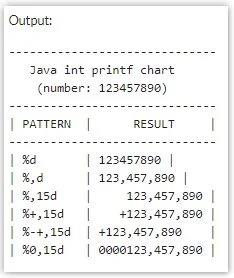
Java int and long formatting example
Here's a compact Java 25 program that formats both an int and a long:
void main() {
    int interesting = 54321;
    long johns = 98765L;

    IO.println("%,d :: %,d".formatted(interesting, johns));
}
With a U.S.-style formatting locale, the result is:
54,321 :: 98,765The format pattern is applied by Java's Formatter machinery through String.formatted(). IO.println() is responsible only for writing the finished String to standard output.
What happened to System.out.printf?
System.out.printf() still exists and is completely valid Java 25:
System.out.printf("%,d%n", 54321);However, the new IO class does not provide an IO.printf() method. For a small Java 25 program, an idiomatic alternative is to format the String and then print it:
IO.println("%,d".formatted(54321));This keeps basic console I/O consistent around the Java 25 IO API while retaining the same familiar Formatter syntax.
Java integer format syntax
The general Formatter pattern for a decimal integer looks like this:
%[argument_index$][flags][width]dFor everyday integer output, the useful pieces are:
| Pattern | Purpose |
|---|---|
%d | Print a decimal integer. |
%,d | Add locale-sensitive grouping. |
%10d | Use a minimum width of 10 and right-align. |
%-10d | Use a minimum width of 10 and left-align. |
%010d | Pad unused width with zeros. |
%+d | Always show a plus or minus sign. |
% d | Prefix positive values with a space and negative values with a minus sign. |
%(d | Display negative values in parentheses. |
Add grouping separators
The comma flag requests locale-sensitive grouping:
void main() {
    long population = 1234567890L;
    IO.println("%,d".formatted(population));
}
With a U.S. formatting locale:
1,234,567,890The comma in the format string is a Formatter flag. It does not guarantee that the actual output character will be a comma in every locale.
Use an explicit Locale when output must be predictable
String.formatted() uses the JVM's default formatting locale. If an example, test or data export requires predictable U.S. punctuation, use String.format() with an explicit locale:
void main() {
    long value = 1234567890L;
    var output = String.format(
        Locale.US,
        "%,d",
        value
    );

    IO.println(output);
}
In a Java 25 compact source file, classes exported by java.base, including Locale, are automatically available, so this small program does not require an explicit import.
Control field width
A width places the formatted integer in a field with a minimum number of characters:
void main() {
    int value = 54321;

    IO.println("|%10d|".formatted(value));
    IO.println("|%-10d|".formatted(value));
}
The output is:
|     54321|
|54321     |
Positive width is right-aligned by default. The - flag left-aligns the value.
Zero-pad a Java integer
Use the 0 flag when you want zero padding:
void main() {
    int value = 54321;
    IO.println("%010d".formatted(value));
}Always show the sign
The + flag displays a sign for both positive and negative numbers:
void main() {
    IO.println("%+d".formatted(98765));
    IO.println("%+d".formatted(-98765));
}Combine grouping, width, signs and zero padding
Formatter flags can be combined:
void main() {
    int interesting = 54321;
    long johns = 98765L;

    var output = "%0,10d :: %+,7d"
        .formatted(interesting, johns);

    IO.println(output);
}
With a U.S. locale, the output is:
000054,321 :: +98,765The first pattern, %0,10d, requests grouping, zero padding and a minimum width of 10. The second, %+,7d, requests an explicit sign, grouping and a minimum width of 7.
Create an integer formatting chart with Java 25 IO
A compact Java 25 source file makes it easy to compare several integer formatting patterns:
void main() {
    int number = 123456789;

    IO.println("-------------------------------");
    IO.println(" Java 25 integer format chart");
    IO.println("-------------------------------");
    IO.println("| %-9s | %15s |".formatted("PATTERN", "RESULT"));
    IO.println("-------------------------------");
    IO.println("| %-9s | %15d |".formatted("%d", number));
    IO.println("| %-9s | %,15d |".formatted("%,d", number));
    IO.println("| %-9s | %+,15d |".formatted("%+,d", number));
    IO.println("| %-9s | %-+,15d |".formatted("%-+,d", number));
    IO.println("| %-9s | %0,15d |".formatted("%0,15d", number));
    IO.println("-------------------------------");
}
This example uses IO.println() for all output and String.formatted() for all Formatter-style formatting.
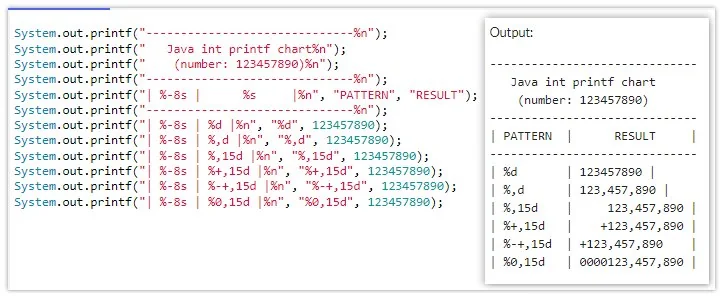
Formatter patterns control grouping, width, alignment and signs for Java integer output.
Run a Java 25 compact source file
One of the nicest Java 25 improvements for small examples is that you no longer need an explicit class declaration or public static void main(String[] args).
Save this as IntegerFormat.java:
void main() {
    int value = 54321;
    IO.println("%,d".formatted(value));
}
Run it directly:
java IntegerFormat.javaOr compile and run it normally:
javac IntegerFormat.java
java IntegerFormat
When should you use NumberFormat instead?
Formatter patterns are excellent when you want explicit control over the layout of a number. For strongly localized user-facing number output, NumberFormat can be a better abstraction.
void main() {
    long value = 1234567890L;

    var formatter = NumberFormat
        .getIntegerInstance(Locale.US);

    IO.println(formatter.format(value));
}
For console tutorials, reports and fixed-width output, Formatter patterns remain concise and powerful. For application interfaces intended for different locales, consider the locale-focused number-formatting APIs.
Java 25 integer formatting cheat sheet
| Goal | Java 25 expression |
|---|---|
| Plain integer | IO.println("%d".formatted(value)); |
| Grouped integer | IO.println("%,d".formatted(value)); |
| Width of 10 | IO.println("%10d".formatted(value)); |
| Left-aligned | IO.println("%-10d".formatted(value)); |
| Zero-padded | IO.println("%010d".formatted(value)); |
| Always show sign | IO.println("%+d".formatted(value)); |
For modern Java 25 examples, a particularly clean pattern is to use Formatter syntax through String.formatted() and send the result to IO.println(). You keep the expressive formatting syntax developers already know while using Java 25's much simpler console I/O API.