

How to format a Java double with printf
Java's printf method makes it easy to control how double and float values appear in console output.
The most important floating-point format specifier is %f. Add a precision such as .2 or .3 to control the number of digits printed after the decimal point.
double value = 1234.12345;

System.out.printf("%.2f%n", value);
System.out.printf("%.3f%n", value);
The output is:
1234.12
1234.123
The value is rounded for display. The underlying double is not changed.
Java printf double syntax
A floating-point format pattern has this general structure:
%[argument_index$][flags][width][.precision]fFor most everyday examples, you only need four pieces:
%starts the format specifier.- Optional flags control grouping, signs, alignment and padding.
- Optional width sets the minimum field width.
- Optional precision controls the number of digits after the decimal point.
Java double printf example
Here's a compact Java 15 example that formats both a double and a float:
double mint = 1234.12345;
float sum = 1234.12345f;

System.out.printf("%,.3f :: %,.5f%n", mint, sum);
With a U.S. locale, the output is:
1,234.123 :: 1,234.12341The second value may surprise you. A Java float has less precision than a double, so the decimal representation of 1234.12345f is not exact.
If exact decimal values matter, especially for money, use BigDecimal rather than relying on binary floating-point arithmetic.
Use %f, not %d, for double values
%f formats floating-point values such as float and double.
%d is for integral values such as byte, short, int and long.
double price = 19.95;
int quantity = 4;

System.out.printf("Price: %.2f%n", price);
System.out.printf("Quantity: %d%n", quantity);
Using the wrong conversion specifier causes a runtime formatting exception rather than silently converting the value.
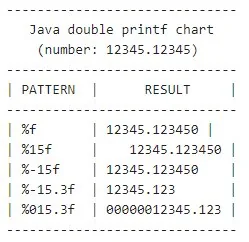
printf patterns used with double values.Format a double to two decimal places
The most common requirement is to print a floating-point value with two digits after the decimal point.
System.out.printf("%.2f%n", Math.PI);The output is:
3.14The same rule works with any precision:
System.out.printf("%.0f%n", Math.PI);
System.out.printf("%.3f%n", Math.PI);
System.out.printf("%.6f%n", Math.PI);Add thousands grouping
The comma flag requests locale-specific grouping:
double population = 1234567.89;

System.out.printf("%,.2f%n", population);
With Locale.US, the output is:
1,234,567.89The exact grouping and decimal characters depend on the locale. Do not assume every locale uses commas for thousands and periods for decimals.
Make printf output deterministic with Locale
System.out.printf() uses the JVM's default formatting locale unless you provide one explicitly.
If an example, test or machine-readable output must always use U.S. punctuation, specify the locale:
import java.util.Locale;

double value = 1234567.89;

System.out.printf(
    Locale.US,
    "%,.2f%n",
    value
);
This guarantees:
1,234,567.89For user-facing software, however, using the user's locale is often preferable.
Set the minimum field width
A number before the precision specifies a minimum field width:
double value = 1234.5;

System.out.printf("|%10.2f|%n", value);
The result occupies at least 10 characters and is right-aligned:
| 1234.50|If the formatted value is wider than the requested width, Java prints the complete value. Width never truncates a number.
Left-align a formatted double
Use the - flag to left-align the value inside its field:
System.out.printf("|%-10.2f|%n", 1234.5);Zero-pad a Java double
The 0 flag fills unused width with zeros instead of spaces:
System.out.printf("%010.2f%n", 1234.5);Grouping and zero padding can also be combined:
double value = Math.PI * 999 * -1;

System.out.printf(Locale.US, "%0,10.2f%n", value);
The output is:
-03,138.45This format breaks down as follows:
0requests zero padding.,requests locale-specific grouping.10specifies a minimum width of 10 characters..2prints two digits after the decimal point.fformats a floating-point value.
Always show the sign
The + flag prints a sign for both positive and negative values:
System.out.printf("%+.2f%n", 12.5);
System.out.printf("%+.2f%n", -12.5);Common Java printf flags for doubles
| Flag | Purpose | Example |
|---|---|---|
- |
Left-align within the field width | %-10.2f |
+ |
Always display a sign | %+.2f |
0 |
Pad unused width with zeros | %010.2f |
, |
Use locale-specific grouping | %,.2f |
space |
Prefix positive numbers with a space when no sign is printed | % .2f |
( |
Display negative values in parentheses | %(,.2f |
Create a formatted printf table
Field width becomes especially useful when printing columns:
double number = 12345.12345;

System.out.printf("-----------------------------%n");
System.out.printf("| %-10s | %-12s |%n", "PATTERN", "RESULT");
System.out.printf("-----------------------------%n");
System.out.printf("| %-10s | %12f |%n", "%f", number);
System.out.printf("| %-10s | %12.2f |%n", "%.2f", number);
System.out.printf("| %-10s | %,12.2f |%n", "%,.2f", number);
System.out.printf("| %-10s | %012.2f |%n", "%012.2f", number);
System.out.printf("-----------------------------%n");
This demonstrates another useful formatter token: %n. Unlike a hard-coded newline character, %n emits the platform-appropriate line separator.
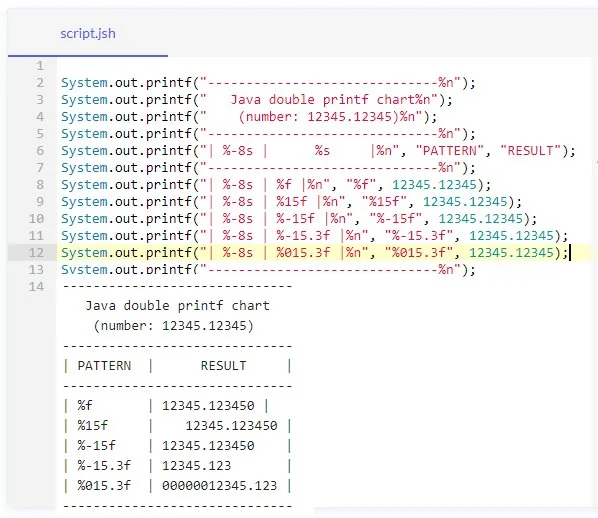
printf.Printf is for formatting, not financial arithmetic
Formatting a value to two decimal places does not make binary floating-point arithmetic suitable for exact financial calculations.
For example, use BigDecimal when decimal arithmetic must be exact:
import java.math.BigDecimal;

var price = new BigDecimal("19.95");
var tax = new BigDecimal("1.60");
var total = price.add(tax);

System.out.printf("Total: %.2f%n", total);
For fully localized currency display, NumberFormat.getCurrencyInstance() is usually a better fit than manually constructing a currency string with printf.
Java double printf cheat sheet
| Goal | Pattern |
|---|---|
| Default floating-point output | %f |
| Two decimal places | %.2f |
| Three decimal places | %.3f |
| Thousands grouping and two decimals | %,.2f |
| Minimum width of 10 | %10.2f |
| Left-aligned width of 10 | %-10.2f |
| Zero-padded width of 10 | %010.2f |
| Always show sign | %+.2f |
For most Java double formatting, %.2f, %,.2f and a field-width variant such as %10.2f cover the majority of everyday requirements.