

The main difference between Swing and JavaFX is their role in today's Java ecosystem. Swing is a mature GUI toolkit included with the JDK and remains widely used in existing desktop applications. JavaFX, developed as the OpenJFX project and distributed separately from the JDK, provides a more modern UI model with CSS styling, FXML, a scene graph, animation and multimedia APIs.
For many new Java desktop applications, JavaFX is the stronger starting point. Swing can still be a practical choice when maintaining an existing Swing application, depending on mature Swing libraries, or integrating with a large Swing codebase.
Desktop development in Java
Yes, developers can use Java to develop graphical user interfaces (GUIs). In fact, Java's ability to create cross-platform desktop apps was one of the language's biggest selling features when it was released in 1995.
As Java evolved, its desktop toolkits evolved too. The Abstract Window Toolkit (AWT) arrived first, Swing expanded Java's desktop component model, and JavaFX later introduced a scene-graph-based approach designed for richer modern interfaces. These technologies still coexist rather than forming a strict replacement chain.
5 reasons to choose JavaFX over Swing
JavaFX is generally the better fit when a new application needs modern styling, animation, declarative layouts or integrated media. Some of its notable capabilities include:
- A modern graphics engine.
- Support for modern web technology such as CSS.
- FXML support for templates and page design.
- Scene graph architecture.
- Multimedia and web integration.
Modern graphics engine
JavaFX uses the Prism graphics pipeline. Prism can use hardware acceleration where supported and can fall back to software rendering when necessary. The exact rendering backend is an implementation detail that can vary by JavaFX version and platform, so applications should generally rely on JavaFX's rendering abstraction rather than a particular graphics API.
CSS styling
Unlike Swing, you can use CSS to style your JavaFX interfaces. This makes it very easy to adapt the default look and feel to match, for instance, your corporate identity. Libraries such as AtlantaFX and JMetro add themes to an application to consistently adjust the styling across all components.
FXML support
When developers create a user interface with JavaFX, they can follow two different approaches:
- Code-only. All components are constructed with code and added to a layout component.
- FXML. The layout is created in an XML-based file with bindings to the code to handle, e.g., button presses.
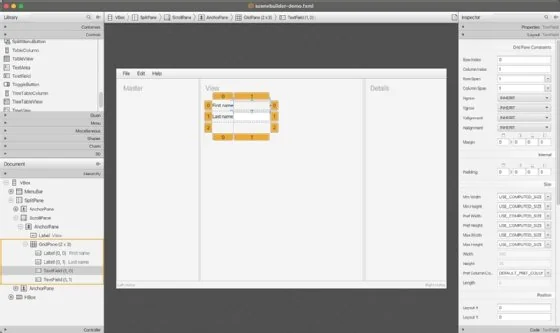
The FXML approach results in a clearer separation between the design of the user interface and the application logic. Scene Builder is a WYSIWYG editor that helps developers create such FXML files. This approach is especially handy for development teams where different people create the layout and logic.
Scene graph architecture
JavaFX represents visual content as a scene graph made of Node objects. Layout containers such as Pane and HBox, controls such as Button and Label, and other visual elements participate in this hierarchy. A Scene contains the root node, and a Stage represents a top-level window. Transformations and effects can naturally propagate through the node hierarchy.
Multimedia and web integration
The JavaFX framework contains components with built-in support for web views, media playback and 3D graphics. With these, developers can expand far beyond what was possible with traditional UI frameworks such as Swing and AWT.
The role of Swing and Java's AWT
Included as part of the original 1995 JDK release, AWT was the first library to support GUI development in Java.
AWT relies heavily on native platform peers and provides a relatively small component set. Swing, introduced as part of the Java Foundation Classes and incorporated into JDK 1.2, added a much richer collection of mostly lightweight components, pluggable look-and-feel support and a more flexible desktop UI toolkit.
The Swing components, and the framework Swing provided for GUI-based application development in Java, were well received by the community which used the technology to develop a variety of enterprise-grade desktop applications, including the popular IDE IntelliJ IDEA.
A minimal Swing application looks as follows:
import javax.swing.*;

public class HelloWorldSwing {

    public static void main(String[] args) {
        SwingUtilities.invokeLater(() -> {
            JFrame frame = new JFrame("Hello Swing World!");
            frame.setDefaultCloseOperation(JFrame.EXIT_ON_CLOSE);
            frame.setSize(300, 200);

            JLabel label = new JLabel(
                "This is a label",
                SwingConstants.CENTER
            );

            frame.add(label);
            frame.setLocationRelativeTo(null);
            frame.setVisible(true);
        });
    }
}
The future of Swing and AWT
AWT and Swing remain part of the Java desktop APIs shipped with the JDK, which is important for the large installed base of Swing applications. They are mature technologies, so development is focused far more on compatibility, maintenance and fixes than on adding major new UI capabilities.
Oracle positioned JavaFX as the strategic direction for richer Java client applications during the Java 7 era. Swing nevertheless remained in the JDK and continues to support a substantial body of existing desktop software.
What is JavaFX?
JavaFX had a bit of a winding path.
JavaFX began with JavaFX Script and was substantially redesigned for JavaFX 2, which exposed its APIs directly to Java developers. JavaFX was bundled with Oracle's JDK for several releases, then decoupled from the JDK beginning with Java 11. The open source implementation is developed as OpenJFX.
JavaFX is modular. Applications can depend on modules such as javafx.controls, javafx.fxml, javafx.web and javafx.media according to their needs.
Developers commonly add OpenJFX dependencies through Maven or Gradle, use JavaFX SDK distributions directly, or choose JDK distributions and tooling that bundle JavaFX.
JavaFX is the modern Java UI toolkit for teams that want these capabilities. Existing Swing applications do not necessarily require a rewrite: Swing and JavaFX can coexist, which can make incremental migration possible when there is a business reason to modernize selected screens.
JavaFX example
The following code shows a simple JavaFX application written to be executed using JBang:
///usr/bin/env jbang "$0" "$@" ; exit $?

//DEPS org.openjfx:javafx-controls:23

import javafx.application.Application;

import javafx.scene.Scene;

import javafx.scene.control.Label;

import javafx.scene.layout.StackPane;

import javafx.stage.Stage;

/**

 * You can execute this example with jbang.dev,

 * which will fetch a matching Java runtime if needed:

 * $ jbang HelloWorldJavaFX.java

 */

public class HelloWorldJavaFX extends Application {

    @Override

    public void start(Stage primaryStage) {

        StackPane root = new StackPane();

        Label label = new Label("This is a label");

        root.getChildren().add(label);

        Scene scene = new Scene(root, 300, 200);

        primaryStage.setTitle("Hello JavaFX World!");

        primaryStage.setScene(scene);

        primaryStage.show();

    }

    public static void main(String[] args) {

        launch(args);

    }

}
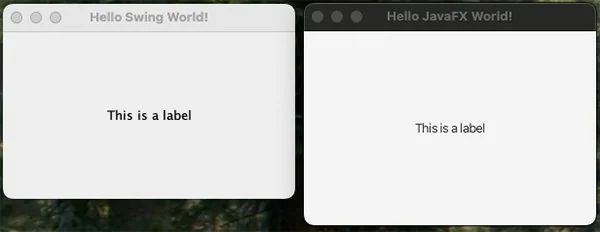
And here is what the code looks like when it runs in JBang:
Swing vs. JavaFX at a glance
| Area | Swing | JavaFX |
|---|---|---|
| JDK availability | Included with the JDK | Typically added separately as OpenJFX |
| UI model | Component-based desktop toolkit | Scene graph |
| Styling | Look and feel, UI delegates and custom painting | CSS-based styling |
| Declarative UI | No built-in equivalent to FXML | FXML and Scene Builder |
| Best fit | Existing Swing applications and Swing-specific ecosystems | New, feature-rich Java desktop applications |
Which to choose: Swing or JavaFX?
So now, which to choose for your next Java project: Java Swing or JavaFX?
Swing played an important role in the evolution of GUI development on the Java platform. Many legacy programs still use Swing components, which means interest in the JFC classes that support Swing will continue far into the future.
For a greenfield Java desktop application, JavaFX is usually the better default when the project benefits from CSS, FXML, animation, media support or a modern scene graph. Swing remains relevant for maintenance work and can still be sensible when a project depends heavily on the Swing ecosystem.
The decision is therefore less about declaring one toolkit universally superior and more about matching the toolkit to the application. For new feature-rich desktop interfaces, start by evaluating JavaFX. For established Swing applications, the cost and benefit of migration should drive the decision.
Frank Delporte is a Java Champion, software engineer, documentation writer and author who loves to write, podcast and experiment with Java and JavaFX.