

Java length vs length() explained
The key difference between an array’s length field and Java’s length() method is that the array length field describes the size of an array, while Java’s length() method tells you how many characters a text String contains.
The String length() method
To get information about an object in Java, you typically go through a public method.
To get the size of a String in Java, you call the String’s length() method. This returns the number of UTF-16 code units in the String. For ordinary BMP text this often matches what people think of as characters, but some Unicode characters use a surrogate pair and therefore contribute two to length().
Java String length() example
Here’s a simple example of using the Java length() method to get the number of characters in a text String:
var text = "Length example";
int stringLength = text.length();

IO.println(stringLength);
Notice the round brackets at the end of the Java length() method? This is one of the primary differences between the length() method and an array’s length field.
The array length field
To get the size of an array in Java, you access the array’s length property.
Notice how we have switched from talking about Java’s length() method to Java’s length property. From the syntax standpoint, the String’s length method has round brackets, while the array’s length property does not. This is a primary difference between the two uses of the word length in Java.
A length example for Java arrays
Here is an example of using the String length() method to get the number of elements in an array:
int[] numbers = {1, 2, 3, 4, 5};
int arrayLength = numbers.length;

IO.println(arrayLength);
Differences between Java length and length()
Here are the key differences between the two Java length constructs and how to use them in code:
- The array
lengthfield is used with arrays - The String
length()method is used with the String class - The array
lengthfield returns the size of an array - The String
length()method returns the number of characters in a text String - The String
length()method must have round brackets at the end - The array
lengthfield throws a compile error if you add round brackets - The String
length()method is a good example of data encapsulation - The array
lengthfield has its roots in C and C++ programming
Similarities between the array length field and method
The biggest similarity between the two Java length constructs, be it for Strings or arrays, is that they help to determine the number of elements an object contains.
They key difference between Java length and length() constructs is that the method works with the String class, while the property works with arrays.
This subtle difference often confuses new developers who are just getting used to Java syntax. This is because:
- In Java, a method must have round brackets at the end of it: length()
- In Java, properties are not followed by brackets or braces: length
If you put round brackets at the end of a property, or left off a method name, this causes a Java compile time error. Sadly, the associated error message isn’t very helpful, as we see below.
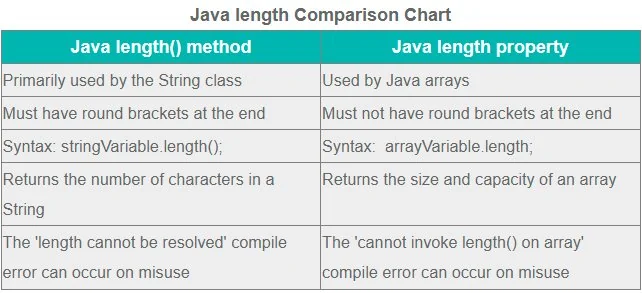
How to compare Java length versus length() for arrays and Strings.
Java length compile time errors
If round brackets do not follow a Java length() method call, the following code error occurs:
<span style="color: #003366">length cannot be resolved or is not a field</span>If round brackets come after a array length field, the following code error occurs:
<span style="color: #003366">Cannot invoke length() on the array type int[]


</span>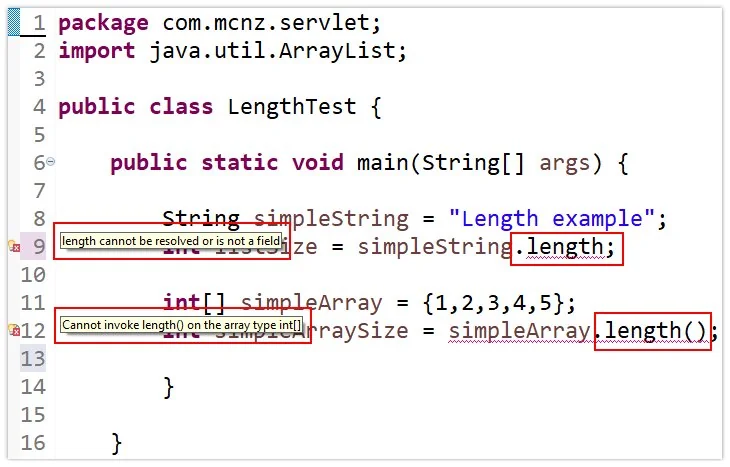
If Java length and length() syntax is mixed up, compile time errors occur.
Why do arrays and Strings use the Java length differently?
Java values the encapsulation of data and properties, which means any information you access about an object should come through a public method.
The Java String’s length() method complies with this best practice. So why doesn’t an array?
The difference exists because arrays are special language-level objects in Java, while String is an ordinary class whose API exposes its size through a method.
C++, Java and the length of an array
The Java programming language was written in such a way that developers who program in C and C++ can more easily adopt this language.
Arrays have special syntax and JVM support, including the public final length field. Strings are class instances, so their API follows normal object-oriented method syntax and exposes the value through length().
The difference between Java length() versus length in Java can be confusing for new developers. It’s just a one-off rule about how arrays work differently from Strings that Java developers just have to accept.
You’ll get used to it eventually. Trust me.

Cameron McKenzie is an AWS Certified AI Practitioner, Machine Learning Engineer, Solutions Architect and author of many popular books in the software development and Cloud Computing space. His growing YouTube channel training devs in Java, Spring, AI and ML has well over 30,000 subscribers.