

If you want to understand functional programming in Java, the java.util.function.Function interface is one of the best places to start.
A Function<T,R> accepts one value of type T and returns one value of type R. Its single abstract method is named apply.
R apply(T value);That's the whole contract.
The real power comes from the fact that a Function can be represented by a normal class, an anonymous inner class, a lambda expression or a method reference. The same abstraction also appears throughout the Java Streams API.
Java Function interface basics
Suppose we want a function that accepts an Integer, squares it and returns the result as a String.
The type is:
Function<Integer, String>That means:
Integeris the input type.Stringis the return type.
The method therefore behaves like this:
String apply(Integer value);1. Implement Function with a normal class
There is nothing magical about Function. It is an ordinary Java interface, so you can implement it with a normal class:
import java.util.function.Function;

final class SquareToString
        implements Function<Integer, String> {

    @Override
    public String apply(Integer value) {
        return Integer.toString(value * value);
    }
}
Use it like any other implementation:
Function<Integer, String> function =
    new SquareToString();

System.out.println(function.apply(2));
The output is:
4This approach is useful when the behavior deserves a named reusable class, but it is usually more ceremony than necessary for a tiny transformation.
2. Implement Function with an anonymous class
Before lambda expressions were added to Java, anonymous classes were commonly used for small one-off interface implementations:
Function<Integer, String> function =
    new Function<Integer, String>() {
        @Override
        public String apply(Integer value) {
            return Integer.toString(value * value);
        }
    };

System.out.println(function.apply(3));
The result is:
9The code works, but most modern Java developers would use a lambda expression for such a simple function.
3. Implement Function with a lambda
Because Function is a functional interface, it can be implemented with a lambda expression.
A deliberately verbose lambda looks like this:
Function<Integer, String> verbose =
    (Integer value) -> {
        return Integer.toString(value * value);
    };
Java can infer the parameter type, and a single expression does not need braces or an explicit return. The same function can therefore be written much more cleanly:
Function<Integer, String> concise =
    value -> Integer.toString(value * value);

System.out.println(concise.apply(5));
The output is:
25This is the style you will see most often in modern Java code.
4. Use Function with Stream.map()
The Java Streams API is one of the places where Function becomes especially useful.
The map operation accepts a function that transforms each stream element into another value.
import java.util.List;
import java.util.function.Function;
import java.util.stream.Collectors;

var numbers = List.of(2, 3, 4);

Function<Integer, String> square =
    value -> Integer.toString(value * value);

var results = numbers.stream()
    .map(square)
    .collect(Collectors.toList());

System.out.println(results);
Because this article targets Java 15, the stream result is collected with Collectors.toList(). The convenience method Stream.toList() arrived later.
The output is:
[4, 9, 16]This is a very common functional-programming pattern: define a transformation once and pass it into an API that knows when and how to invoke it.
Use a method reference when it reads better
Sometimes a lambda simply calls an existing method. In that case, a method reference can be even cleaner.
Function<Integer, String> toString =
    String::valueOf;

System.out.println(toString.apply(42));
The method reference still satisfies the same Function<Integer,String> contract.
Compose Java Functions
Function also provides default methods that let small functions be combined.
For example, square a number and then add a label:
Function<Integer, Integer> square =
    value -> value * value;

Function<Integer, String> label =
    value -> "Result: " + value;

Function<Integer, String> combined =
    square.andThen(label);

System.out.println(combined.apply(6));
The output is:
Result: 36andThen() runs the first function and passes its result into the second function.
The related compose() method performs the operations in the opposite order.
Function vs UnaryOperator
If the input type and return type are the same, Java provides a specialized functional interface named UnaryOperator<T>.
Instead of this:
Function<Integer, Integer> square =
    value -> value * value;
you can write:
UnaryOperator<Integer> square =
    value -> value * value;
Both work. UnaryOperator simply communicates that the input and output types are identical.
Function vs Consumer, Predicate and Supplier
The java.util.function package contains several important functional interfaces. The easiest way to distinguish them is by what goes in and what comes out.
| Interface | Input | Output |
|---|---|---|
Function<T,R> |
One value | One value |
Consumer<T> |
One value | No result |
Predicate<T> |
One value | boolean |
Supplier<T> |
No input | One value |
UnaryOperator<T> |
One value | Same type |
Where is Function used in the Streams API?
The clearest example is Stream.map(), whose mapper is a Function.
flatMap() also accepts a function, although its return type is itself a stream.
reduce() is slightly different. Its common overloads use BinaryOperator or BiFunction, not a plain single-argument Function. That's an important distinction because reduction combines multiple values rather than simply mapping one input to one output.
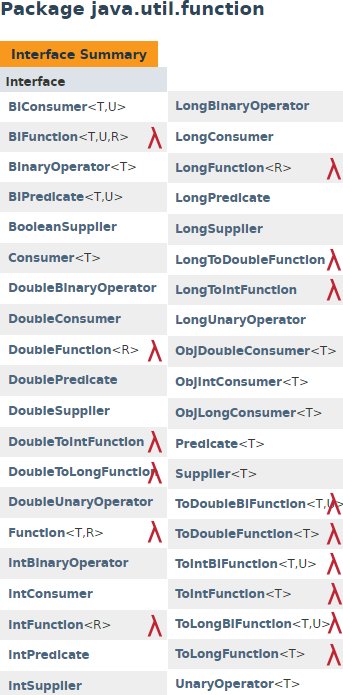
Function is one of several important interfaces in Java's java.util.function package.
Java Function interface cheat sheet
Function<Integer, String> square =
    value -> Integer.toString(value * value);

String result = square.apply(5);

Function<Integer, Integer> doubleIt =
    value -> value * 2;

Function<Integer, String> pipeline =
    doubleIt.andThen(String::valueOf);
The key idea is simple: Function<T,R> represents a transformation from one value to another.
Once that concept makes sense, Java lambdas, method references and stream operations such as map become much easier to understand.